
One Click Is All It Takes. Most phishing attacks don't break through your firewall, they walk through your inbox.
KorProtections works inside Microsoft Outlook to inspect every link and attachment before you open it. In seconds, you see the real destination, hidden redirects, and whether the site is safe, without leaving your inbox.
🔒 Local processing only | No data leaves your device | No cloud storage | No IT setup required
Phishing emails are designed to look exactly like messages from Microsoft, your bank, or your supplier. They pass straight through spam filters, because they're not spam. They're targeted. And they only need one person to click once.
Emails that appear to come from trusted companies or banks but redirect users to fake login pages designed to steal credentials and confidential information.
KorProtections shows you the real destination before you ever arrive.
Fake invoices, payment requests, and urgent business emails that trick users into transferring money or sharing confidential information.
KorProtections flags suspicious senders and spoofed domains before you act.
Hidden threats that capture passwords, install malware, or give attackers unauthorized access to your systems and email accounts.
KorProtections gives you one final check before the breach begins.
It doesn't replace your spam filter. It works after the email has already arrived, at the exact moment you decide to click. That's the moment your spam filter can't protect you. That's where KorProtections is.
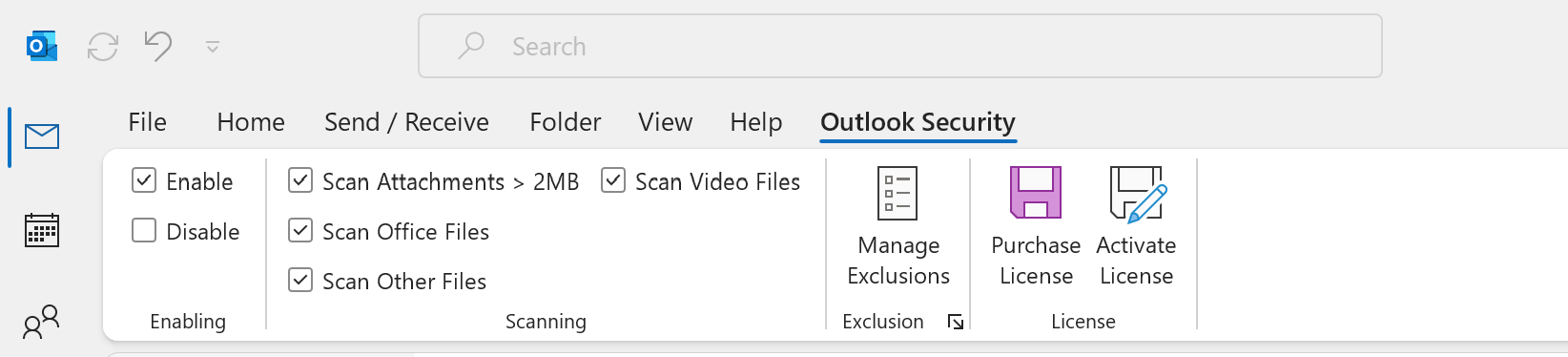
No new dashboard. No separate app. No IT department required. KorProtections lives in your Outlook ribbon, where you already work.
Scan and analyse every link before opening. You see where it actually goes, not just what it claims to be. Redirects, spoofed domains, and phishing sites are flagged instantly.
When something looks wrong, you get a simple, plain alert. Safe, suspicious, or dangerous, you always know what you're looking at and you decide.
Malicious scripts, ransomware, and hidden payloads are often disguised as invoices or documents. KorProtections analyses attachments. So you know what you're opening before it's too late.
KorProtections is built for anyone who sends and receives email in classic Microsoft Outlook, and can't afford to be wrong about what they click.
You receive dozens of emails a day. Attackers know that, and they design phishing emails that look exactly like your normal workflow. KorProtections gives you a second set of eyes on every link.
You don't have an IT security team watching your inbox. One successful phishing attack can cost tens of thousands in recovery, lost data, and downtime. KorProtections is the protection that doesn't require enterprise resources.
Distributed teams mean distributed risk. When your people work from home, coffee shops, and client sites, you can't control their environment, but you can control what happens when they click a link.
Phishing attacks are sophisticated precisely because they fool careful, experienced people. KorProtections doesn't require you to know what a spoofed domain looks like, it tells you once scanned.
KorProtections analyzes links and attachments in real time, giving you a clear safety check before you interact with any email content.
An email arrives in your Outlook inbox, including those passed your spam filter
KorProtections extracts links. Warning appears for harmful attachments.
Select link and Preview and Anlayse, before clciking and opening
A warning appears if the link is suspicious or malicious
You decide whether to proceed or avoid the risk
Modern phishing emails are engineered to evade spam filters. Attackers register brand-new domains hours before sending. They copy real emails, real logos, and real sender names, and they target
you at your busiest moment.
One employee opening a malicious link can lead to credential theft, ransomware, data breaches, and financial fraud. KorProtections helps reduce this
risk by giving users a final security check before interacting with email content.
🔒 Local processing only, all analysis runs on your machine, not a remote server.
🚫 No cloud storage, your emails, links, and attachments are never uploaded or stored.
This is a core design decision, not a policy. It's built into how KorProtections works.
Every day without KorProtections is another day where one click is all it takes. Installation takes 3 minutes. The trial is free for 10 days. No credit card required
Works instantly inside Microsoft Outlook. No IT support. No data sharing. No risk to try.
Download Free 10-Day Trial